Intranso Operate · Fleet and dispatch
Run the network in real time, not from yesterday’s report
See every vehicle and every trip live, with trips detected from GPS automatically and a control room that puts the most expensive problem first.
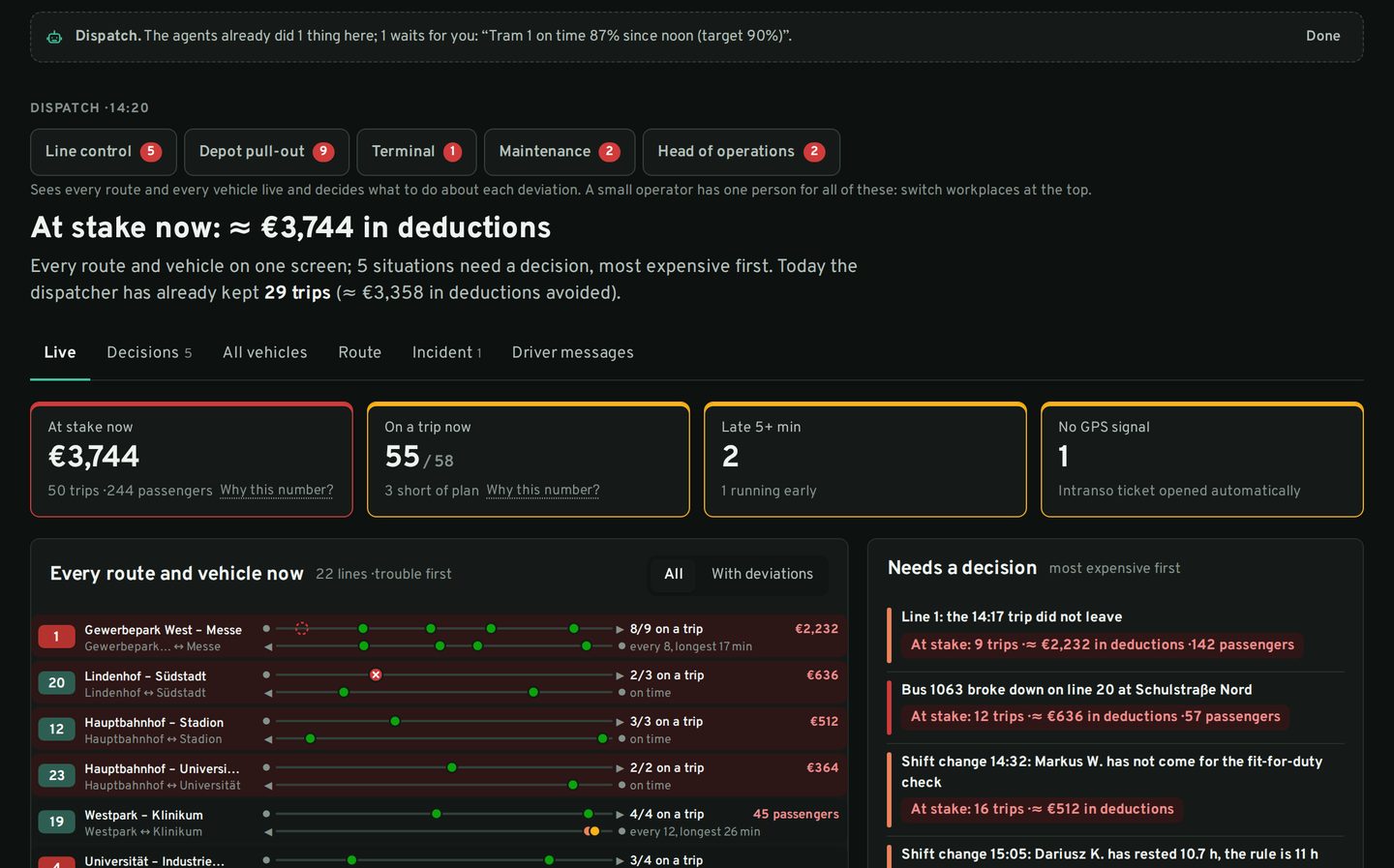
Intranso Operate · Control room
A missed trip, fixed in seconds
A vehicle breaks down. The control room shows what it will cost, an agent proposes a reserve, the dispatcher confirms with one click and riders get the new arrival time.
Animation: a vehicle breaks down, the control room shows what it costs, an agent proposes a reserve, the dispatcher confirms and the trip is saved.
Animation. Numbers are illustrative.
Overview
Live fleet, trips detected from GPS, a control room ranked by cost.
Operate is the working screen of the operator and the dispatcher. It tracks every vehicle, detects every trip from GPS without manual input, manages blocks and trip assignments, alerts on what goes wrong and, in the control room, turns deviations into a ranked list of decisions. It works for any fleet, from city buses and trams to municipal service vehicles.
Exceptions first, with the cost of each one and what to do.
Mileage, hours, depot times, fuel and service in one place.
Who went out, who did not and what happened on the line, from the phone.
Capabilities
What it does
Fleet monitoring
Positions, tracks and the state of every vehicle.
- Live map with search, vehicle card, route and stops; shareable vehicle linkLive
- Tracks with boarding and alighting points; all tracks; positions tableLive
- Stops, parking, short stops, terminal layover zones and geofencesLive
- Speeding and speed graph; depot departure and return timesLive
- Operating hours and mileage by month and any period, Excel and PDFLive
- Fuel consumption and oil change remindersLive
Routes, blocks and trips
Every trip found and assigned, with or without a timetable.
- Route registry: directions, stops and map; create or upload routesLive
- Automatic trip and block detection from GPSLive
- Block registry; assign vehicles to blocks; trip auto-assignmentLive
- Trip diagram (vehicles × time) and route diagram with live vehiclesLive
- Delay log, trip and block history with export; charter ordersLive
- On-route / off-route status; assignment from the operator’s rosterLive
Alerts and control room
Problems reach the right person before they cost money.
- Driving events and notification centreLive
- Telegram alerts and a 07:00 daily summaryLive
- Position marked “located by Intranso” when the main GPS is jammedLive
- Control room: exceptions first, each priced in penalties and riders at riskLive
- Driver rest-time and shift-change alertsLive
- Agents dispatch a reserve vehicle and inform riders within your rules2027
“Live” — available to clients today. A date — when the capability is released.
How it works
From the first vehicle to a working control room
Connect
Our counters and trackers, or positions from your existing GPS system.
Load the network
We load your routes and stops; you check them on the map.
Trips appear
Trips and blocks are detected from GPS from the first day.
Alerts and control
Telegram alerts, the daily summary and the control room for dispatchers.
Details
Data, formats and integration
- Fleets
- Bus, trolleybus, tram; municipal, service and freight vehicles
- Positioning
- GPS in the counter or a tracker; backup position under jamming
- Third-party GPS
- Positions from another system connected once; trips and reports on top
- Users
- Dispatchers, observers, administrators; Telegram access by invitation
- Sub-carriers
- Partner vehicles in one cabinet with separate rights
- Exports
- Excel, PDF, CSV
Pricing
How to get it
Operate is the core of every package; the control room is an add-on to Trips and City
FAQ
Frequently asked questions
We already use another GPS system. Can we keep it?
Yes. We connect it once and add trip detection and city reporting on top: the “Trips without counting” package.
Do we need a timetable to see trips?
No. Trips are detected from GPS on their own. With a timetable you also get plan against actual.
See Intranso on your own network
A 45-minute walkthrough on your routes and your data. We reply the same working day.